
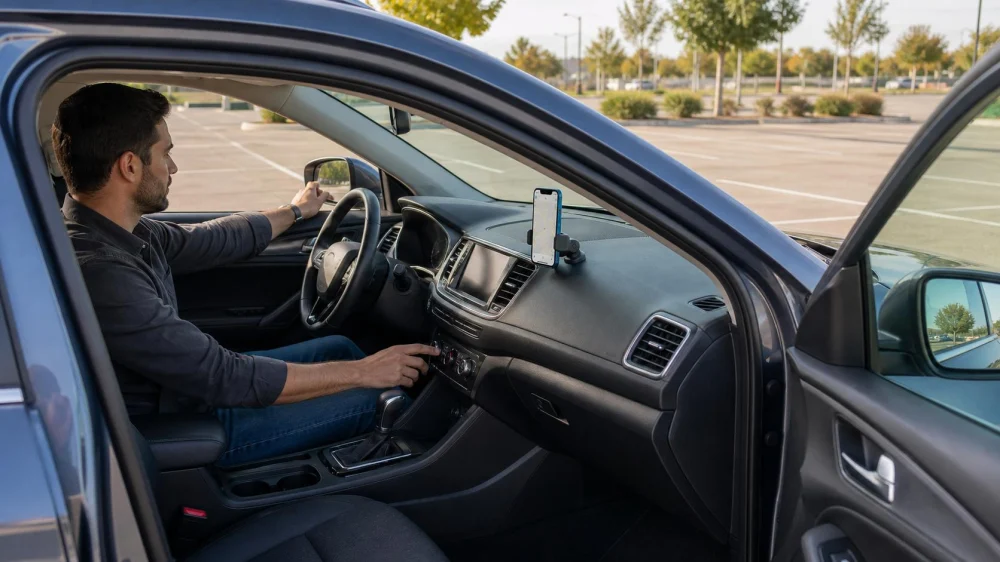
Rental Car Controls: Set Up Before Entering Traffic
On this page
Quick answer
Before moving a rental car, adjust the seat, steering wheel, mirrors, head restraint, and climate; locate lights, wipers, defrost, hazards, parking brake, gear selector, fuel or charge display, and key driver-assistance controls. Pair a phone and enter navigation only while parked. If a warning, unfamiliar feature, poor fit, or blocked view remains unresolved, ask rental staff before entering traffic.
Why it matters
A rental control setup is a parked orientation that makes an unfamiliar vehicle operable without searching for basic functions while driving. Modern cars place controls and automatic features differently even within one fleet class.
This U.S. guide supports normal pickup. It does not replace the owner's manual, rental walkthrough, adaptive-equipment assessment, or driver training. Only an authorized and appropriately licensed driver should operate the car.
Practical checklist
- Walk around the vehicle and confirm doors, hatch, fuel or charge port, tires, lights, and visible damage.
- Adjust seat distance, height, backrest, steering wheel, head restraint, and mirrors before buckling in.
- Locate start and stop, gear selection, parking brake, hazards, signals, headlights, high beams, and wipers.
- Find front and rear defrost, climate controls, window locks, door locks, and child locks when relevant.
- Review fuel type, charge level, range display, return requirement, and dashboard warnings.
- Understand cruise, lane, parking, camera, and automatic-braking indicators without relying on them.
- Set navigation, audio, accessibility, and phone connection while fully parked.
Step-by-step plan
- Complete the exterior check and photograph existing damage before loading luggage that may hide a panel or prevent hatch closure.
- Build a stable driving position. Confirm full pedal reach, steering clearance, belt fit, and a clear view without an extreme seat position.
- Practice stationary controls. Operate wipers, washers, lights, defrost, hazards, and parking brake once while parked.
- Read the dashboard. Do not dismiss warning lights as normal rental behavior; ask staff to explain or exchange the car when appropriate.
- Review automation. Learn how adaptive cruise, lane assistance, auto hold, one-pedal behavior, start-stop, and parking cameras indicate status and how to disengage safely.
- Set the route before moving. Mount the phone lawfully, silence unnecessary alerts, and choose the first safe stopping point for later changes.
- Begin in a low-demand area. Check brake feel, steering, visibility, acceleration, and vehicle size before joining faster traffic.
Photograph the starting fuel or charge level, mileage, warnings, and damage. Save the branch and roadside numbers. Do not photograph or store another renter's personal data if it appears in the system.
Limits and warning signs
A quick setup cannot reveal every fault or teach an unfamiliar vehicle's full technology. Camera views have blind areas, and driver-assistance features can misread lanes, weather, obstacles, or traffic. The driver remains responsible.
Do not drive with unresolved brake, steering, tire, restraint, visibility, door-latch, warning-light, or control concerns. Return to the counter or call the rental company from a safe parked place. Use roadside or emergency help when the vehicle is unsafe or immediate danger exists.
Frequently asked questions
Should I pair my phone before leaving?
Only while parked. Also plan to delete the pairing, contacts, messages, and destinations before return.
What if I cannot find the parking brake?
Ask staff or consult the vehicle information before moving. Electronic controls differ and should not be guessed.
Can I rely on the backup camera?
No. Use mirrors, direct observation, and a slow controlled check; cameras have blind zones and can be obscured.
What if the seat does not fit safely?
Request another vehicle or approved adaptive solution. Do not improvise with loose cushions or pedal extenders.
Sources and evidence
This process reflects common vehicle familiarization and defensive-driving practice: set fit and visibility, locate critical controls, resolve warnings, configure devices while parked, and treat assistance systems as support rather than substitutes.
Conclusion and next steps
Spend several parked minutes on the controls before accepting the exit lane. Demonstrate to yourself that you can signal, clear the windshield, activate hazards, stop, and park without searching. Ask staff about anything unclear before traffic raises the stakes.




 Enterprise Rent-A-Car4.0 (504 reviews)
 Arrowhead Viewing Spot & Historical Monument4.0 (67 reviews)
 Rent A Toyota at McGovern Toyota of Portsmouth4.0 (9 reviews)
 Hertz Car Rental - Automall Hle3.0 (80 reviews)
 Budget Car Rental3.0 (81 reviews)
 Yachty Rentals3.0 (44 reviews)
 How to Extend Enterprise Car Rental: Step-by-Step Guide for U.S. Travelers
 Do All Car Rental Companies Require a Deposit? Here's What You Need to Know
 Rental Car Additional Drivers: Authorization, Age, and Fees
 Is a Car Rental Business Profitable? Insights and Strategies for Success
 How to Get Cheap Car Rental: Tips for Finding Affordable Options
 What Does Enterprise Car Rental Insurance Cover and How It Protects You