
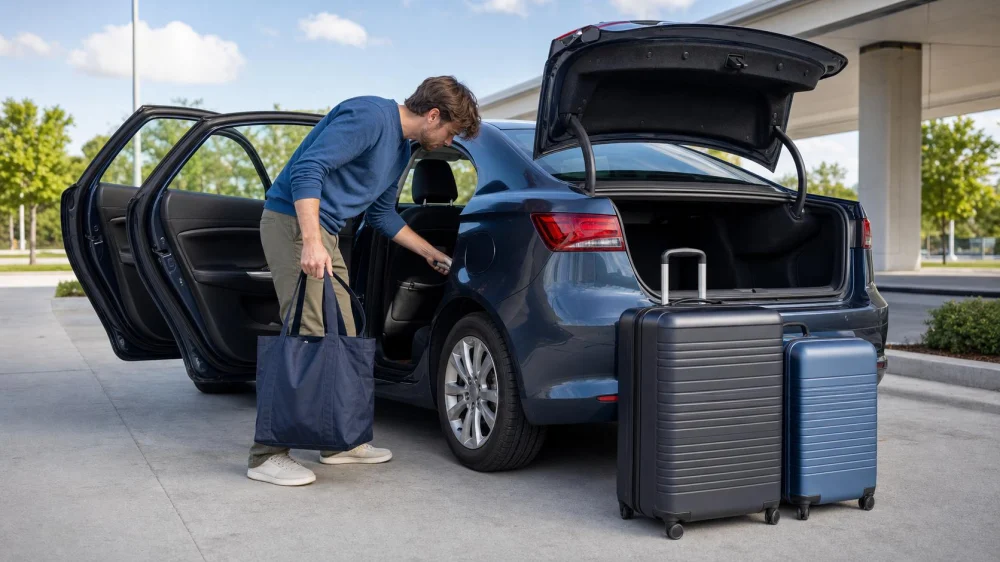
Rental Car Lost-Item Prevention Before You Return
On this page
Quick answer
Prevent lost items by creating a short inventory before travel, packing while the car is well lit, and searching in the same order every time: seats, pockets, floor, console, doors, trunk, and charging areas. Remove paired phones, navigation history, and garage codes while parked. Photograph the empty cabin and cargo area, then keep keys and return proof until the company confirms the handoff.
This guide is for U.S. rental-car returns. Company procedures, privacy controls, and lost-property policies vary; follow the rental agreement and location instructions.
Build a return inventory
Write the items most likely to remain in the vehicle: phone, charging cable, sunglasses, wallet, passport, keys, child items, medication, mobility aids, toll device, garage remote, and luggage pieces.
Count bags before loading and use the same count at return. Keep small essentials in one personal bag rather than distributing them across door pockets and cup holders.
Do not pack for the first time in a dark return lane. Choose a safe, legal, well-lit place before entering the facility.
Search the vehicle by zones
- Front seats: check cushions, seams, under seats, floor, and seat-back pockets.
- Console: empty cup holders, covered bins, wireless charging pads, and dashboard shelves.
- Doors: inspect every pocket and bottle recess.
- Rear cabin: check child-seat areas, floor mats, and folded-seat gaps without disturbing vehicle wiring.
- Cargo area: inspect corners, parcel shelves, side compartments used during the trip, and the ground behind the car after unloading.
- Exterior use points: retrieve adapters or personal items used for fuel, charging, bicycles, or luggage.
Use a flashlight, but do not reach blindly into seat rails or equipment compartments. Do not remove vehicle panels or factory emergency equipment.
Remove personal digital data
While parked, disconnect phone projection and Bluetooth pairings. Delete personal navigation destinations, contacts, messages, call history, Wi-Fi details, profiles, and garage-door codes where the vehicle permits it.
Use the manual or rental instructions for a guest-data reset. Do not perform a factory reset that affects vehicle operation or fleet settings. After removal, confirm your phone no longer automatically connects.
Unplug cables and adapters from USB, household-style, and 12-volt outlets. Check wireless charging pads carefully because dark phones blend into the surface.
Control the final fuel or charging stop
At the last stop, keep receipts and payment cards in the personal bag immediately. Remove any personally owned charging adapter and close vehicle ports according to instructions.
Check the roof, hood, trunk edge, and ground before driving away; phones, wallets, and keys are often set down temporarily. Never walk into moving traffic to recover an item.
Follow the rental company's fuel or charge requirement and retain the requested proof, but keep it separate from the lost-item search.
Complete the handoff
Before locking the car, photograph the empty cabin, trunk, odometer or charge/fuel display when permitted, and parked location. Images document condition and can also reveal an overlooked item.
Use the designated key drop or staff handoff. Do not leave keys in an improvised location. Save the return confirmation and note the exact time, level, row, and space for after-hours returns.
If you discover a missing item later, contact the location promptly through its official lost-property process. Describe the item without exposing unnecessary sensitive details and keep the rental agreement number available.
Two-minute final checklist
- Count people, bags, child items, and mobility equipment.
- Check seats, pockets, floor, console, doors, and trunk.
- Retrieve every cable, adapter, remote, and toll device.
- Remove paired devices and personal destinations while parked.
- Look at the roof and ground after unloading.
- Photograph the empty interior and return location.
- Place keys and return proof in their designated handoff paths.
- Wait for confirmation before deleting documentation.
Limitations and important notes
- Do not delay in an unsafe lane or block a return facility while searching.
- Keep medication, passports, keys, and essential assistive items with you rather than in checked luggage.
- Child-seat removal should follow manufacturer instructions and preserve all personal parts.
- Lost-property recovery is not guaranteed and may involve third-party facility procedures.
- Do not share tracking-device locations publicly; coordinate safely with the rental company and authorities when appropriate.
Frequently asked questions
What is the most commonly missed area?
There is no universal answer, but covered consoles, door pockets, wireless charging pads, seat-back pockets, and cargo corners are easy to overlook.
Should I factory-reset the car's screen?
Use the approved guest-data removal method. A full reset may affect fleet settings; ask the rental company when uncertain.
What if I left an item after an after-hours return?
Contact the return location through its official process as soon as possible. Provide the agreement, return position, and a precise description.
Can I re-enter the rental lot to search?
Follow facility security and staff instructions. Do not enter restricted or moving-vehicle areas without permission.
How long should I keep return photos?
Keep them with the agreement and return confirmation until billing and the rental company's process are complete.
Sources and evidence notes
The method reflects common travel and fleet-return practice: inventory valuables, search systematically, remove personal data, document the empty vehicle, and preserve handoff proof. The rental company provides the controlling return and lost-property procedure.
Use one empty-bag rule
Put one empty tote or pouch in your luggage now. At return, sweep every small personal item into it while searching the car by zones. When the bag count, cabin photos, digital-data check, and key handoff are complete, leave the return area with proof in your personal bag.






 Budget Car Rental2.0 (77 reviews)
 Go Rentals5.0 (2 reviews)
 Hertz Car Rental - Lafayette - Sagamore Parkway N3.0 (221 reviews)
 Budget Car Rental3.0 (49 reviews)
 Avis Car Rental4.0 (227 reviews)
 Hertz Car Rental - Indio - Hwy 1113.0 (134 reviews)
 Renting a Car for the Holidays: How to Secure Your Vehicle in Advance
 How to Return Your Rental Car Early or Extend Your Reservation
 Who Owns Payless Car Rental and What It Means for Customers
 How Much Does Car Rental Cost? Understanding Car Rental Pricing
 What Car Rental Company is the Best for Your Next Trip?
 Best Credit Cards That Offer Free Rental Car Insurance in the US: Save on Your Next Rental