
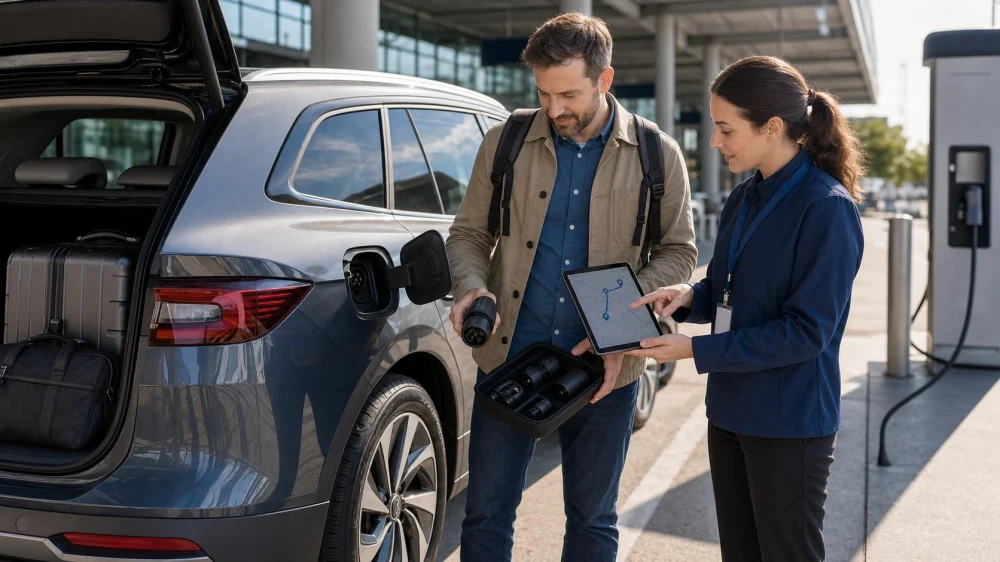
Renting an EV: Verify Charging Before You Accept the Keys
On this page
Quick answer
Before accepting a rental EV, confirm the actual model, usable range estimate for your route, charging connector, included adapters and cable, charging-network access, hotel or destination charging, and required return charge. Photograph the starting charge and equipment. Keep at least one backup charging stop and ask what roadside support does if a charger or vehicle fails.
Confirm the exact vehicle
An “electric car or similar” booking may not identify the model until pickup. Range, cargo space, charging speed, connector, navigation, and cold- or hot-weather performance vary. Ask which vehicle is assigned before leaving the counter and verify it matches the contract.
Use the displayed range as an estimate, not a promise. Speed, elevation, weather, heating or air conditioning, luggage, and driving style affect consumption. Plan with a buffer rather than scheduling arrival at nearly zero charge.
Check connectors and adapters
- Locate the charge port and confirm how it opens.
- Identify the supported AC and DC fast-charging connector.
- Inventory every cable and adapter listed by the rental company.
- Photograph equipment condition and storage location.
- Ask whether any adapter is prohibited or missing.
- Learn how to release a locked charging cable safely.
Do not assume a station shown on a map fits the car. Verify connector, power level, access hours, and current operating status in the relevant network or station information.
Map a realistic charging route
- Enter the full route, including side trips and the return location.
- Choose primary charging stops near food, restrooms, or planned activities.
- Check recent station availability and access restrictions.
- Add a backup station before the battery reaches the minimum buffer.
- Confirm overnight charging with the property rather than relying on an icon.
- Recheck the plan when weather, traffic, or route changes.
A charger at a hotel may be occupied, paid, limited to guests, valet controlled, or incompatible. Ask about reservation, price, overnight parking, and idle fees.
Understand charging and return costs
Read who pays for charging, how sessions are started, whether the car has an account, and how charges appear later. Some networks require an app or payment method; others may bill through the rental account with administrative fees.
Find the required return percentage and how it is measured. Ask about fees for returning below the threshold, cable or adapter loss, towing, idle time, and charging after return. Keep charging receipts and screenshots until the final rental statement is settled.
Test the setup at pickup
- Photograph odometer, charge percentage, estimated range, and exterior condition.
- Confirm mobile signal or navigation can locate chargers.
- Practice selecting a charger and viewing battery preconditioning instructions.
- Check that charging equipment matches the inventory.
- Ask staff to demonstrate charging if the workflow is unfamiliar.
- Save roadside assistance and rental-branch contact details.
Build a charging backup
Keep two independent ways to find stations, such as the vehicle navigation and a network or mapping app. Do not rely on a single rural charger or a station that closes behind a parking gate. Leave enough charge to reach an alternate site.
If charging repeatedly fails, follow the on-screen steps once, check the station and vehicle instructions, and contact the network or rental provider. Do not force a connector, use an unapproved adapter, or attempt electrical repair.
EV rental decision checklist
- Good fit: predictable route, compatible fast chargers, overnight option, schedule flexibility, and clear return rule.
- Needs more planning: cold weather, towing, mountain driving, remote areas, tight itinerary, or multiple drivers unfamiliar with EVs.
- Consider another vehicle: no reliable compatible charging, no time buffer, inaccessible stations, or unclear roadside support.
Important notes and limitations
Charging connectors, network access, pricing, station status, vehicle software, and rental policies change. Verify the current rental agreement, vehicle manual, station operator, and lodging directly. Never handle damaged charging equipment, charge in standing water, or use a cable or adapter that the vehicle or rental provider does not approve.
Evidence and source notes
The checklist uses information controlled by four primary sources: the signed rental agreement, the exact vehicle’s built-in guidance and manual, the charging-station operator, and the destination property. Those current sources should override generic web advice because availability and policies can change without notice.
Frequently asked questions
Should I prepay for EV charging with the rental company?
Compare the package terms with your route and expected use. Check what is included, unused value, administrative fees, and whether charging can also be paid directly.
Can I use any fast charger?
No. Confirm connector compatibility, vehicle support, station access, and any required adapter before arrival.
How much charge should I keep as a buffer?
There is no universal percentage. Increase the buffer for cold, elevation, speed, remote routes, uncertain stations, and schedule constraints.
Can I rely on hotel charging?
Only after confirming connector, access, price, reservation, parking, and availability directly with the property.
What if the car will not charge?
Stop if equipment is damaged or unsafe, follow the vehicle and station instructions, and call the charging operator or rental roadside support. Do not improvise electrical repairs.
Next steps
Ask for the exact model, map a primary and backup charge stop, confirm destination access and return percentage, then photograph charge and equipment at pickup. Choose another vehicle if the route lacks a reliable buffer.





 PUSH 2 START LLC0.0 (0 reviews)
 Elite SS Rentals, LLC5.0 (5 reviews)
 TeslaRents4.0 (11 reviews)
 Hertz Car Rental - Winder Ga3.0 (50 reviews)
 MPH Club5.0 (4 reviews)
 Enterprise Rent-A-Car4.0 (169 reviews)
 Renting a Car for Your US National Park Adventure: Top Tips
 How to Make Your Car Rental Experience Smooth and Stress-Free
 Renting a Car for a Business Conference: What to Look For
 What is the Best Car Rental Company for Your Next Trip?
 Best Fuel Saving Tips When Driving a Rental Car
 How to Extend Budget Car Rental Without Stress